Is your digital watch showing the wrong time? It can be frustrating when your watch doesn’t match the clock on your phone or computer.
But don’t worry—adjusting the time on a digital watch is easier than you think. Whether your watch has three buttons or just two, you can quickly set the correct hour, minute, and even date in just a few simple steps.
In this guide, you’ll learn exactly how to adjust your digital watch’s time so you never miss a beat. Keep reading, and you’ll master the process in no time.

Credit: www.wikihow.com
Digital Watch Basics
Understanding the basics of a digital watch helps in adjusting the time easily. Digital watches show time using numbers on a screen. They often include extra features like alarms or timers.
Most digital watches have buttons around the case. These buttons control different functions. Knowing what each button does is key to setting the correct time.
Common Button Functions
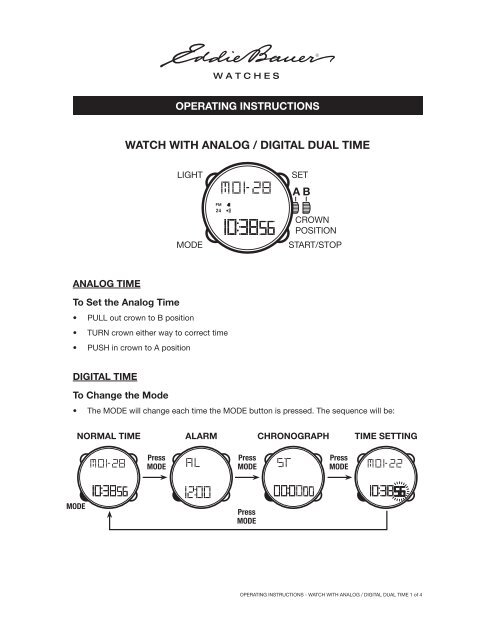
Most digital watches have three or four buttons. The “Mode” button switches between time, alarm, and stopwatch modes. The “Set” or “Adjust” button starts the time-setting process. The “Start/Stop” or “Up/Down” buttons change the numbers for hours, minutes, or date. Some watches use the same button for multiple actions depending on how long you press it. Learning these functions makes time adjustment faster and simpler.
Display Indicators
The digital screen shows different icons and numbers. The flashing digits mean you can change those values. A small “PM” or “AM” icon shows if the time is morning or afternoon. Other indicators might show the alarm is on or the stopwatch is running. Understanding these symbols helps avoid mistakes when setting the time. Always check the display carefully to confirm your settings.
Credit: www.yumpu.com
Accessing Time Setting Mode
Accessing the time setting mode is the first step to adjusting your digital watch. This mode allows you to change hours, minutes, and sometimes the date. Most digital watches have a dedicated button to enter this mode. Understanding how to use this button helps you set the time quickly and accurately.
Using The Mode Button
Locate the Mode button on your digital watch. Press it once to cycle through different functions like alarm, stopwatch, or time display. Keep pressing the Mode button until the time display starts to flash or until you reach the time setting screen. This action signals that the watch is ready for time adjustment.
Different watch brands may vary, but the Mode button usually serves this purpose. Holding the button for a few seconds can also activate the time setting mode on some models. Watch for any changes on the screen to confirm you have entered the correct mode.
Identifying Flashing Digits
Once in time setting mode, look for flashing digits on the screen. These flashing numbers show which part of the time you can adjust, such as hours or minutes. Usually, the seconds will flash first, then the hours, followed by minutes.
Use other buttons like Start/Stop or Reset to change the flashing digits. After setting one part, press the Mode button again to move to the next. This step-by-step flashing guide helps you adjust each time element correctly and efficiently.
Adjusting Hours And Minutes
Adjusting the hours and minutes on a digital watch is a simple task. It helps keep your watch showing the correct time. Most digital watches have buttons that let you change these settings quickly. Follow clear steps to set the time right.
Setting The Hour
First, press the “Mode” button until the hour digits flash. This means the watch is ready for you to change the hour. Use the “Start/Stop” or “Up/Down” buttons to increase or decrease the hour. Watch for the hour changing carefully. Stop when you reach the correct hour.
Setting The Minutes
Next, press the “Mode” button again to make the minutes flash. Use the same buttons to adjust the minutes. Press the buttons slowly to get the exact minute. Check the display closely. Confirm the minutes are correct before moving on.
Am And Pm Indicators
Many digital watches show AM or PM to mark morning or evening. Look for the small “AM” or “PM” sign on the screen. If the watch uses a 12-hour format, make sure this is set right. Press the hour button past 12 to switch between AM and PM. This keeps your watch accurate for day and night.
Setting Date And Other Features
Setting the date and other features on a digital watch keeps your device accurate and useful. The date includes the month and day, which you can change easily using the watch buttons. Other features may include the year and additional settings like alarms or time format. These functions help you customize the watch to your needs and keep it updated.
Adjusting Month And Day
Press the mode button until the month starts flashing. Use the start or stop button to increase the month number. Press the mode button again to move to the day setting. The day will start flashing. Use the same button to set the correct day. Confirm by pressing the mode button to save and move on.
Year And Additional Settings
After setting the day, press the mode button until the year flashes. Adjust the year using the start or stop button. Some watches also allow you to set alarms or switch between 12-hour and 24-hour formats. Use the mode button to cycle through these options and adjust using the start or stop buttons. Finish by pressing the mode button to exit and save all changes.
Saving And Exiting Settings
Adjusting the time on your digital watch is only half the task. Saving and exiting settings is key to ensure changes stick. Without saving, your watch may revert to old time settings. This section guides you through confirming your changes and explains automatic exit options.
Confirming Changes
After setting the correct time, look for a button marked “Set” or “Mode.” Press this button once to confirm your new settings. Some watches require holding the button for two seconds to save changes. Watch the screen closely; it usually stops flashing when the time is saved. If your watch has multiple settings, continue pressing “Mode” to move through each option. Confirm each change before exiting.
Automatic Exit Options
Many digital watches save changes automatically after a few seconds of no button presses. This feature helps avoid accidental resets. Simply stop pressing buttons and wait for the watch to return to normal display mode. The screen will stop flashing to show it saved your settings. If unsure, press the “Mode” button once more to exit manually. This prevents losing your adjustments and keeps your time accurate.
Tips For Different Watch Models
Adjusting time on digital watches varies by model. Different watches have unique methods and buttons. Knowing your watch type helps set the time correctly. Below are simple tips for popular digital watch styles.
Three-button Watches
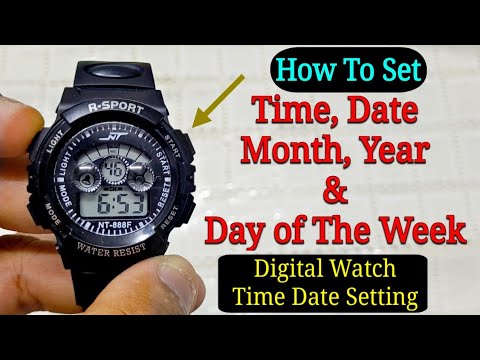
Three-button watches use Mode, Start/Stop, and Reset buttons. Press the Mode button to enter time setting mode. The seconds will flash first. Use Start/Stop to change the flashing value. Press Mode again to move from seconds to minutes, then hours. Adjust each value with Start/Stop. After setting the hour, press Reset to save and exit.
Check for AM/PM indicators when setting hours. Some watches switch between 12-hour and 24-hour formats with the Mode button. Patience is key; press buttons slowly to avoid skipping values. Follow these steps, and your time will be accurate in no time.
Touchscreen Digital Watches
Touchscreen digital watches use taps and swipes for adjustments. Tap the screen to wake the watch. Look for a settings icon or menu. Swipe to find the time or clock settings. Tap the time to start editing.
Use plus or minus buttons on-screen to adjust hours and minutes. Some watches let you swipe up or down to change numbers. Confirm the changes by tapping a checkmark or save button. If no save option appears, wait a few seconds for auto-save.
Touchscreen watches may have different steps depending on the brand. Check your watch manual for exact instructions if needed. These watches are user-friendly with simple screen controls.
Troubleshooting Common Issues
Troubleshooting common issues helps keep your digital watch working correctly. Problems may occur while adjusting time or using other functions. Knowing how to fix these issues saves time and frustration. Follow simple steps to solve common watch problems fast.
Watch Not Responding
Check the battery first. A weak or dead battery can cause the watch to freeze. Replace the battery if needed. Try pressing buttons firmly but gently. Some watches need you to hold buttons for a few seconds to activate settings. Reset the watch by removing the battery for a minute. Put it back and try again. Ensure no dirt or moisture blocks the buttons. Clean the watch carefully with a dry cloth.
Incorrect Time Display
Make sure you are in the right time setting mode. Press the Mode button until the time digits flash. Use the correct buttons to change hours and minutes. Pay attention to AM/PM if your watch uses 12-hour format. Reset the seconds to zero for accuracy. Double-check date settings; wrong date may affect the time display. If the watch shows wrong time after setting, try resetting it completely. Consult the user manual for model-specific instructions.
Credit: www.youtube.com
Frequently Asked Questions
How Do I Set The Time On My Digital Watch?
Press the Mode button until the time flashes. Use Start/Stop to adjust hours and minutes. Press Set to confirm.
How To Set The Time On A Digital Watch With Three Buttons?
Press the MODE button until the hour flashes. Use UP or DOWN to adjust the hour. Press MODE again to set minutes. Adjust with UP or DOWN. Continue to set date if needed. Press MODE to save and exit.
How To Manage Time In A Digital Watch?
Press the Mode button to enter time setting. Use Start/Stop to adjust hours and minutes. Press Reset to confirm.
How To Reset The Time In A Digital Clock?
Press the Mode button until the time flashes. Use Start/Stop to adjust hours and minutes. Press Mode to confirm and exit.
Conclusion
Adjusting the time on your digital watch is simple and quick. Just follow the steps carefully, and you will have the correct time in no time. Remember to use the mode button to find the right setting. Then, change the hour and minutes using the up or down buttons.
Take your time and double-check the settings before saving. This small task helps you stay punctual every day. Practice a few times to feel confident with your watch. Now, you are ready to keep track of time accurately and easily.